
Quick Summary
For related reading, see our best drag and drop website builder article.
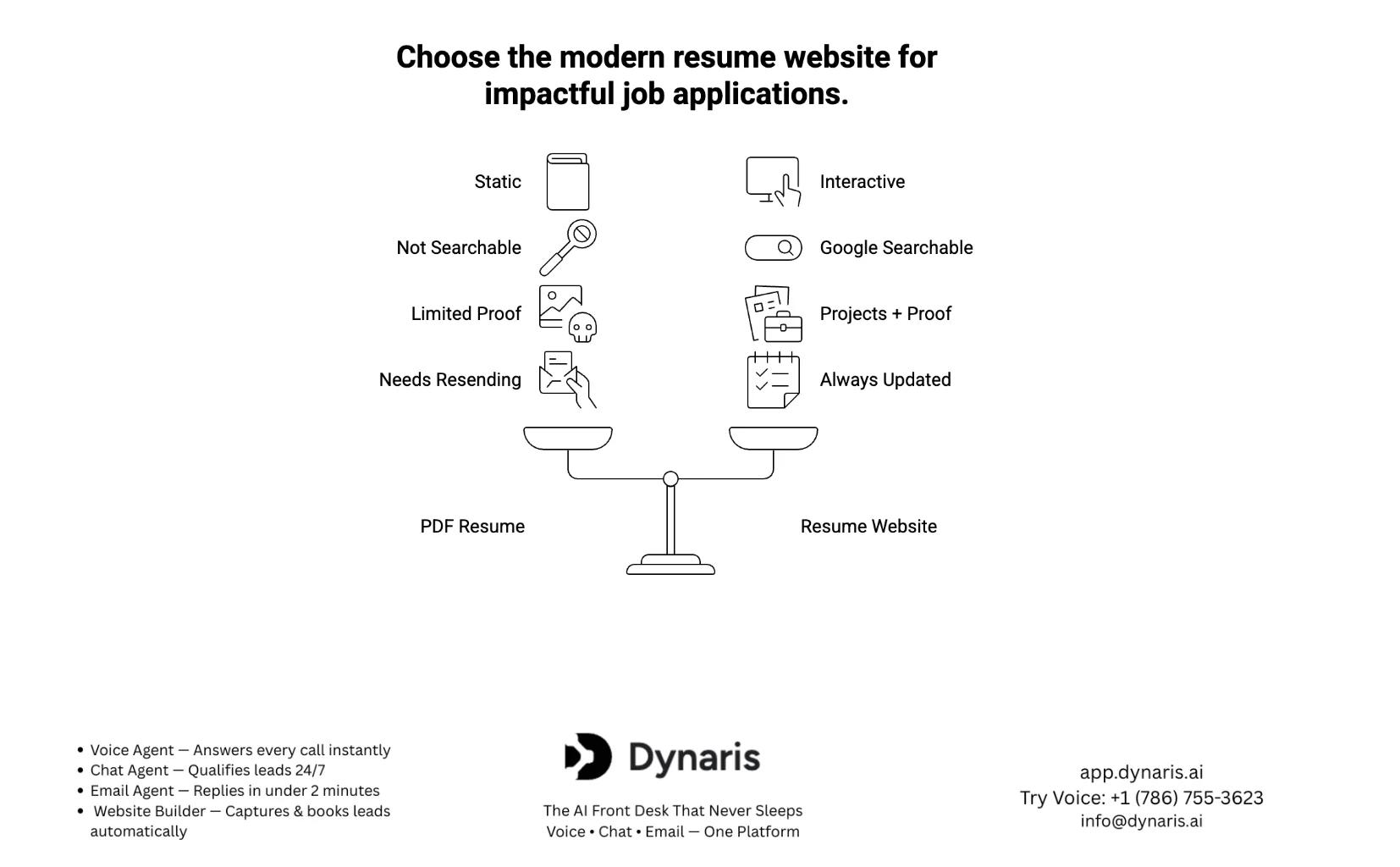
- Resume websites outperform traditional resumes. Recruiters scan quickly and prefer clickable proof. A resume website lets you showcase projects, results, and real impact — helping you stand out instantly.
- SEO makes your profile discoverable. Unlike PDFs, a website can rank on Google for your name and skills. This means opportunities can come to you — even when you are not applying.
- The right platform determines your success. While tools like Wix or WordPress are useful, platforms like Dynaris go further by combining website building with AI-powered automation and lead management.
- Conversion-focused design is key. A high-performing resume website includes clear CTAs, proof-based content, and a clean UX that guides visitors from interest to contact.
- Your resume website becomes a career growth engine. With SEO, analytics, and strategic promotion, your site evolves from a simple portfolio into a system that attracts recruiters, clients, and opportunities globally.
For related reading, see our best personal resume websites article.
Introduction: Why Resume Websites Are No Longer Optional
The 6–7 Second Reality
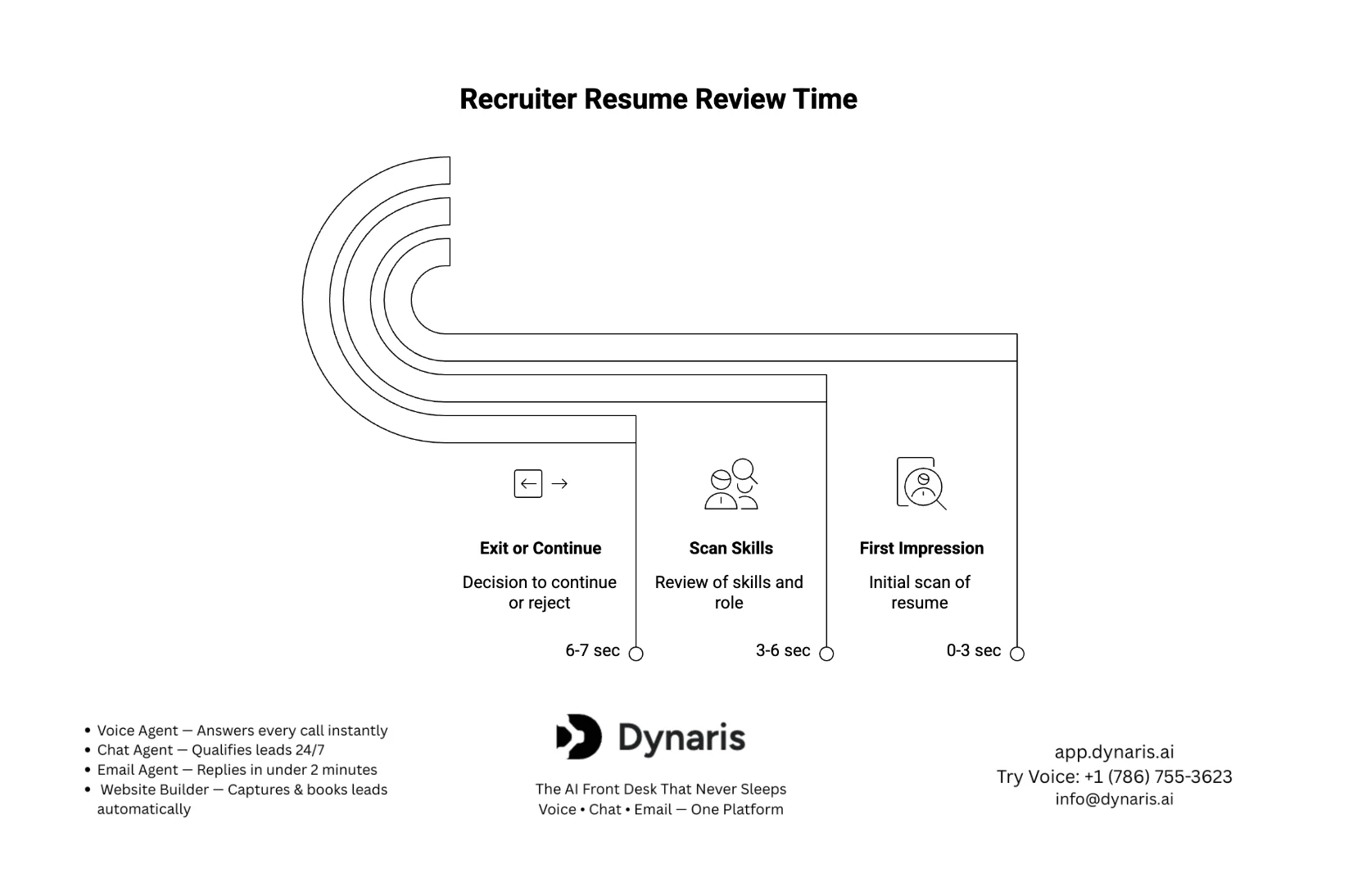
Recruiters do not read resumes — they scan them. [source] Multiple hiring studies consistently show that recruiters spend around 6–7 seconds on an initial resume review. That means your entire professional story is judged almost instantly.
For related reading, see our AI website builder guide article.
For related reading, see our AI SEO optimization guide article.
Now think about this: a static PDF forces your experience into a rigid format. No interaction. No depth. No personality. Users decide whether to stay on a website in about ~6 seconds.
The Problem: PDF Resumes Are No Longer Enough
Traditional resumes still matter — but they are limited by design:
- No interactivity (no clickable demos, videos, or live projects)
- No scalability (you cannot expand details without clutter)
- No discoverability (they do not rank on Google or show up in searches)
- No real differentiation (most resumes look the same)
In a market where recruiters are comparing hundreds of candidates, a plain document simply does not create enough impact.best website builder for nonprofit
The Shift: Personal Branding Is Now Searchable
First impressions of a website are formed in ~3–5 seconds.Hiring has evolved. Recruiters now:
- Google your name before contacting you
- Check LinkedIn and online presence
- Look for proof of work (projects, case studies, results)
If you do not control what shows up — you lose that opportunity to someone who does.
The Solution: A Resume Website
A resume website transforms your career from a static file into a dynamic, searchable personal brand hub. Instead of just listing your experience, you can:
- Showcase real projects with live links
- Add case studies, results, and visuals
- Optimize content for SEO (so recruiters find you organically)
- Create a professional first impression before any interview
In simple terms:
A resume tells people what you have done. A resume website proves it.
What You’ll Learn in This Guide
This guide is designed to go beyond basic tutorials. You’ll learn how to:
- Build a resume website step-by-step
- Structure it for maximum recruiter impact
- Optimize it for Google rankings and visibility
- Turn it into a tool that actually generates interview opportunities
If your goal is not just to apply for jobs — but to get noticed and shortlisted faster, this is exactly what you need.
What Is a Resume Website?
A resume website is a personal website that presents your professional experience, skills, projects, and achievements in an interactive, online format that is accessible, searchable, and continuously updatable. Recommended website load time is under 3 seconds.
Resume vs Portfolio vs Personal Website
Understanding the difference is critical — most people confuse these and end up building the wrong thing.
Resume Website
- Focus: Career summary + experience
- Structure: Similar to a resume but interactive
- Purpose: Help recruiters quickly evaluate you
Portfolio Website
- Focus: Projects and work samples
- Structure: Case studies, visuals, outcomes
- Purpose: Demonstrate skills through proof
Personal Website
- Focus: Broader identity (blog, thoughts, brand)
- Structure: Flexible (articles, opinions, media)
- Purpose: Build long-term authority and presence
Best Strategy: High-performing candidates combine all three into one hybrid site.
Resume Website vs Portfolio vs Personal Website (Ultimate Comparison Table)
| Feature | Resume Website | Portfolio Website | Personal Website |
|---|---|---|---|
| Primary Purpose | Present career summary quickly | Showcase actual work & results | Build personal brand & authority |
| Core Focus | Experience, skills, achievements | Projects, case studies, visuals | Identity, ideas, content, storytelling |
| Content Type | Structured (like resume but interactive) | Visual + detailed work samples | Flexible (blogs, thoughts, media) |
| Depth of Information | Medium (concise but expandable) | High (detailed proof of work) | Very high (broad + personal + professional) |
| User Experience | Fast scanning for recruiters | Exploration of projects | Engagement + personality |
| Interactivity | Moderate (links, sections) | High (live demos, case studies) | Very high (blogs, media, integrations) |
| Visual Elements | Minimal to moderate | High (images, videos, demos) | Depends on style |
| SEO Potential | High (rank for name & role) | Medium–high (project keywords) | Very high (blogs + content) |
| Target Audience | Recruiters, hiring managers | Recruiters + clients | Broad audience (employers, network, public) |
| Best For | Job applications & quick evaluation | Creative/technical professionals | Long-term personal branding |
| Format Length | Short to medium | Medium to long | Unlimited |
| Update Frequency | Occasional (job updates) | Frequent (new projects) | Continuous (content, blog posts) |
| Key Advantage | Easy evaluation by recruiters | Proof of skills (shows vs tells) | Authority + discoverability |
| Big Limitation | Limited storytelling | Can lack summary clarity | Can be too broad if not focused |
Who Needs a Resume Website?
A resume website is no longer limited to developers or designers. It is valuable across almost every profession:
- Students & Fresh Graduates:
- Compensate for lack of experience with projects and learning proof
- Stand out in entry-level applications
- Freelancers & Consultants:
- Showcase past work and client results
- Build trust instantly with potential clients
- Developers & Designers:
- Display live projects, GitHub repos, and UI work
- Demonstrate real-world problem-solving
- Marketers & SEO Professionals:
- Show campaign results, traffic growth, and case studies
- Rank for personal brand keywords
- Executives & Professionals:
- Build authority and thought leadership
- Control online reputation and visibility
If your career depends on being discovered, trusted, or evaluated—you need one.
Types of Resume Websites
Not all resume websites are the same. Choosing the right type depends on your goals.
1. One-Page Resume Website
- Everything on a single scrollable page
- Fast, simple, and recruiter-friendly
- Best for: beginners and quick deployment
2. Multi-Page Professional Website
- Separate pages (About, Projects, Resume, Contact)
- More detailed and scalable
- Best for: professionals with experience
3. Portfolio-First Resume Website
- Projects and case studies are the main focus
- Resume becomes a supporting section
- Best for: creative and technical roles
| Feature | One-Page | Multi-Page | Portfolio-First |
|---|---|---|---|
| Structure | Single scrollable page | Multiple pages | Portfolio-focused |
| Navigation Style | Scroll-based | Menu-based navigation | Project-driven navigation |
| Content Depth | Limited, concise | Detailed and expandable | Deep project-level detail |
| User Experience | Fast and simple | Structured and organized | Visual and interactive |
| Best For | Beginners, students | Experienced professionals | Designers, developers, creatives |
| Focus Area | Summary of experience | Balanced profile (resume + projects) | Work samples and case studies |
| SEO Potential | Moderate (limited pages) | High (multiple indexed pages) | High (project-based keywords) |
| Customization | Low to medium | Medium to high | High |
| Scalability | Limited | Highly scalable | Highly scalable |
| Recruiter Experience | Quick scanning | Easy navigation + depth | Strong proof of skills |
| Build Time | Very fast | Moderate | Moderate to high |
| Maintenance | Low | Medium | High (regular updates needed) |
| Key Advantage | Simplicity and speed | Professional and flexible | Strong differentiation through proof |
| Main Limitation | Can feel too basic | Requires more setup | May lack quick summary if not balanced |
What Makes a High-Converting Resume Website
The difference between an average site and one that gets interviews comes down to structure and intent:
- Clear headline (who you are + what you do)
- Proof of work (projects, results, metrics)
- Easy navigation (no friction for recruiters)
- Fast loading and mobile-friendly design
- SEO optimization (so you appear in search results)
Why You NEED a Resume Website in 2026?
A. Recruiter Behavior
Hiring today is driven by speed + proof, not just credentials.
Fast scanning behavior
Recruiters don't deeply read applications—they scan and filter. Even when additional materials are available, the time difference is minimal:
- Recruiters spend only ~3 seconds more on resumes than portfolios → Petersheim (2022)
This means one thing: If you don't capture attention instantly, you're skipped.
Preference for clickable proof (projects, links)
Modern recruiters expect:
- Live projects
- Clickable case studies
- Evidence of results
Supporting research confirms this shift:
- Portfolios are not mandatory but act as a secondary evaluation tool in hiring → Kieu (2022)
- In some hiring contexts, portfolios play a limited role across all recruitment stages → Minenko (2025)
A portfolio alone isn't enough—but when combined with a resume website, it becomes a deciding factor.
B. Competitive Advantage
“Everyone has a resume, few have a website.” This is where the real leverage is.
- High competition (many applicants per role) increases the importance of having a portfolio → Lukkarinen (2019)
In crowded job markets:
- A resume = entry ticket
- A resume website = differentiation
Most candidates stop at “good enough.” The ones who get interviews go one level deeper.
C. Key Benefits
A resume website is not just a format upgrade—it's a strategic advantage.
- Personal Branding
You control your narrative, positioning, and first impression. - Easy Updates
No need to resend files—update once, reflect everywhere. - SEO Discoverability (BIG Gap Competitors Ignore)
Your website can rank for:- Your name
- Your job role
- Your niche expertise
- Portfolio Integration
Instead of listing skills, you prove them with real work. - Global Visibility
Your profile becomes accessible 24/7, anywhere in the world.
| Feature | Resume (PDF) | Resume Website |
|---|---|---|
| Interactivity | Static | Clickable, interactive |
| SEO visibility | Not searchable | Searchable on Google |
| Portfolio | Limited (links only) | Unlimited (full integration) |
| Updates | Static (resend required) | Dynamic (real-time updates) |
| Personal branding | Weak | Strong |
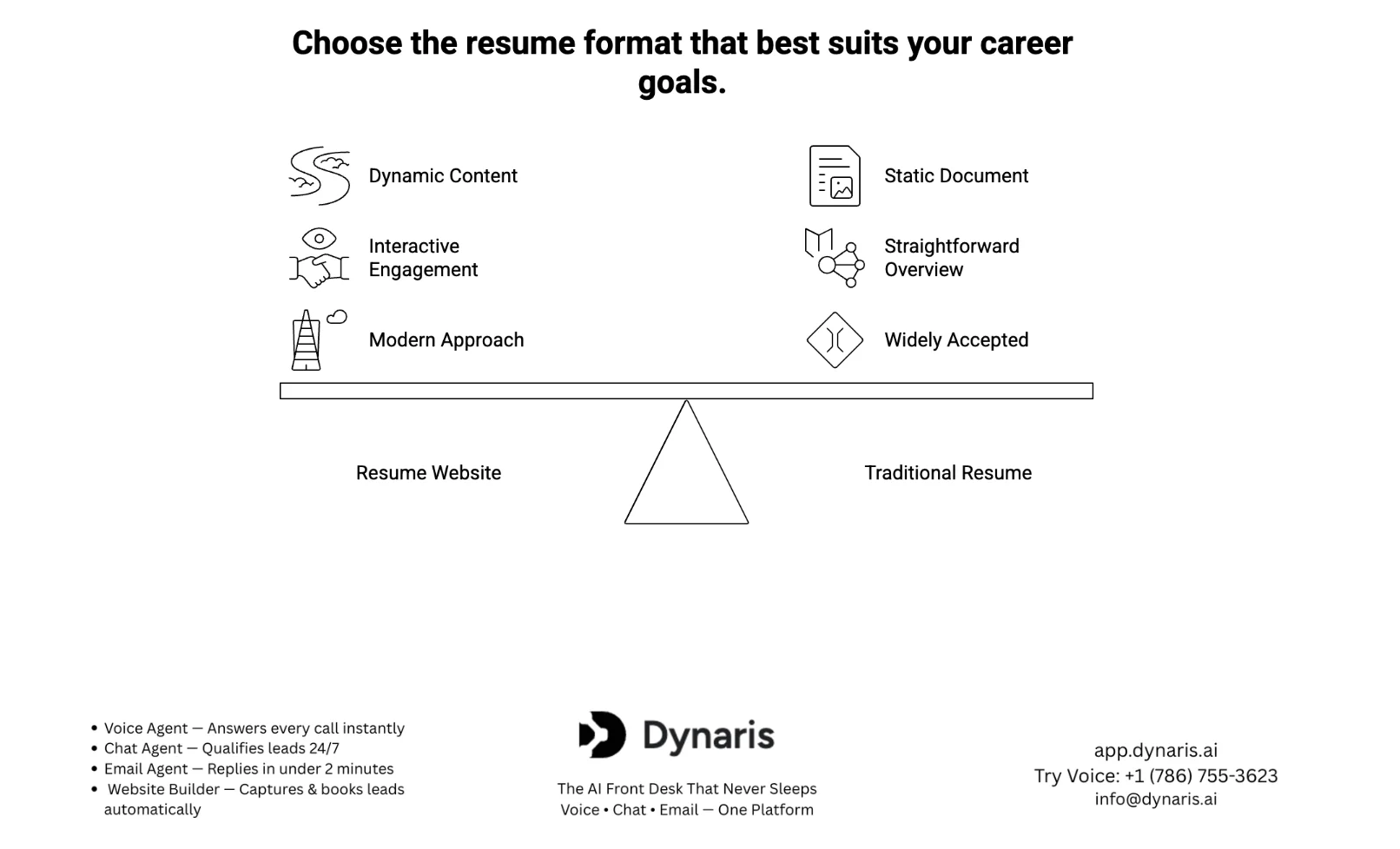
Key Insight: A traditional resume tells your story. A resume website demonstrates it, ranks it, and scales it.
Step-by-Step: How to Build a Resume Website
Step 1: Define Your Goal
Before building anything, define why you are building it. Your goal determines your entire structure.
- Job applications
- Freelance client acquisition
- Personal branding / authority
- Networking
Target audience clarity:
- Recruiters → simple, fast, structured
- Clients → proof-heavy, results-focused
- Industry peers → authority + insights
If you skip this step, your website becomes generic — and ineffective.
Step 2: Choose the Right Platform
Your platform defines how flexible and scalable your website will be.
- Website Builders (Easy): Dynaris, Wix, Canva, Jimdo — best for beginners
- CMS (WordPress): More control + plugins — best balance of ease + power
- Custom Code (Advanced): Next.js, HTML/CSS — full control, highest performance
| Platform Type | Ease of Use | Customization | SEO Capability | Best For |
|---|---|---|---|---|
| Website Builders | Very Easy | Low–Medium | Basic | Beginners |
| CMS (WordPress) | Medium | High | Strong | Professionals |
| Custom Code | Advanced | Very High | Maximum | Developers |
Step 3: Get a Domain Name (Personal Branding Hack)
Your domain is your digital identity. Best practice: use your name (yourname.com).
Why it matters:
- Builds credibility instantly
- Improves SEO for personal searches
- Makes you look professional
Recruiters are more likely to trust a custom domain than a random URL.
Step 4: Pick a Template or Design Layout
Design is important — but clarity beats creativity. Two main approaches: minimal (clean, professional) or creative (bold, visual).
Critical insight: UX > aesthetics
Simpler interfaces lead to better engagement and usability performance metrics → Junghahn (2023). If your design looks good but is hard to navigate, it fails.
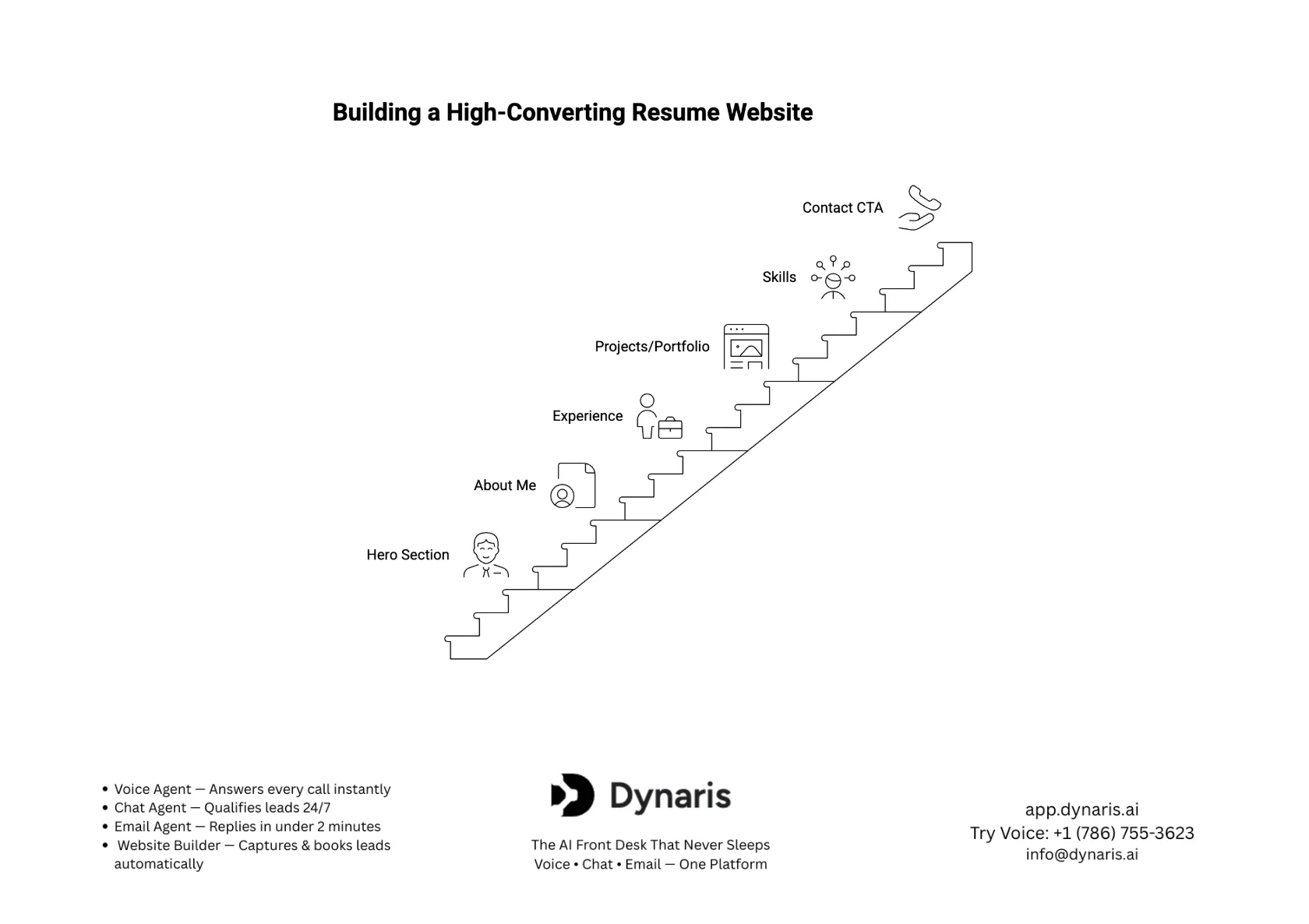
Step 5: Add Essential Resume Sections
These are non-negotiable for a high-performing resume website:
- Homepage (clear value proposition)
- About Me
- Experience
- Skills
- Projects / Portfolio
- Contact
Each section should answer: “Why should I hire you?” — not just “What have you done?”
Step 6: Optimize Design (UX Principles)
Good design = better engagement and lower bounce rate.
- Clean layout with white space
- Mobile-first design
- Fast loading speed
- Key content reachable in 2–3 clicks
Supporting research: Users abandon websites quickly if navigation is unclear; key content must be reachable in 2–3 clicks → Huang & Bilal (2019)
Step 7: Add Visual & Interactive Elements
Static content is forgettable. Visual content is engaging. Add:
- Images and videos
- Case studies
- Project demos
- Timelines or infographic-style resumes for better storytelling
Step 8: Add SEO to Your Resume Website
This is where you outperform competitors. Most resume websites are not optimized for search.
- Use your name as a keyword (e.g., “Jane Doe SEO Specialist”)
- Optimize title tags, meta descriptions, and URL structure
- Add a blog section — share insights, publish case studies, build authority
This turns your resume website into a traffic-generating asset.
Step 9: Publish + Share Strategically
A website without visibility is useless. Promote it everywhere:
- LinkedIn profile
- Email signature
- Job applications
- Personal branding channels
Best Resume Website Examples
1. Minimal Developer Portfolio
What it looks like:
- Clean layout
- Dark/light theme
- Focus on GitHub, projects, and tech stack
Why it works:
- Developers are evaluated on skills + output, not storytelling
- Minimal design keeps focus on code and functionality
- Fast loading improves usability and retention
What to copy:
- Clear headline (e.g., “Full-Stack Developer specializing in React & Node.js”)
- Direct links to GitHub and live projects
- Tech stack displayed visually (icons or badges)
- Simple navigation (no clutter)
2. Creative Designer Resume Website
What it looks like:
- Visual-heavy layout
- Animations, transitions, unique typography
- Portfolio-first structure
Why it works:
- Design roles require visual proof of creativity
- First impression = design quality
- Engages users immediately
What to copy:
- Strong visual hero section
- Case study-based projects (problem → solution → result)
- Smooth transitions (but not overdone)
- Unique but readable typography
3. Corporate Professional Resume Website
What it looks like:
- Clean, structured, formal design
- Focus on achievements, experience, and leadership
- Minimal visuals, more clarity
Why it works:
- Corporate roles prioritize credibility and clarity
- Easy for recruiters to scan quickly
- Builds trust instantly
What to copy:
- Strong summary (value-driven, not generic)
- Bullet-point achievements with metrics
- Simple navigation (2–3 clicks max to key info)
- Professional tone and consistent formatting
Key Takeaway: The best resume websites are not about design alone — they align with how your industry evaluates talent. Developers → functionality. Designers → creativity. Professionals → clarity + credibility.
Best Tools to Build a Resume Website
Categories of Tools
- Beginner Tools (Drag & Drop): Dynaris, Wix, Canva, Jimdo
- Professional Tools: WordPress (Elementor), Webflow, Dynaris
- Developer Tools: Next.js, GitHub Pages, Custom HTML/CSS
| Tool Category | Ease of Use | Pricing | SEO Capability | Customization Level | Best For |
|---|---|---|---|---|---|
| Beginner Tools | Very Easy | Free–Low | Basic | Low–Medium | Beginners |
| Professional Tools | Medium | Medium | Strong | High | Professionals |
| Developer Tools | Advanced | Low–Medium | Maximum | Very High | Developers |
- Use beginner tools if you want speed
- Use professional tools if you want growth + SEO
- Use developer tools if you want full control
Competitors focus on tools—but the real advantage is choosing based on your long-term goal, not just ease.
One-Page vs Multi-Page Resume Website
This decision directly impacts both user experience and SEO performance.
When to Use a One-Page Resume Website
Best for:
- Students
- Entry-level candidates
- Quick deployment
Advantages:
- Simple and fast
- Easy for recruiters to scan
- Lower maintenance
Limitation:
- Limited SEO (only one page to rank)
- Less space for detailed content
When to Use a Multi-Page Resume Website
Best for:
- Experienced professionals
- Freelancers
- Personal branding
Advantages:
- Separate pages (About, Projects, Blog)
- Better content organization
- Scalable over time
SEO Benefits of Multi-Page Websites
This is where most competitors fall short.
Multi-page sites allow you to:
- Rank for multiple keywords
- Create dedicated pages for projects
- Add blog content (authority building)
- Improve internal linking
Example:
- /projects → ranks for portfolio-related searches
- /blog → builds authority
- /about → ranks for your name
Result: More visibility, more traffic, more opportunities.
Final Insight: One-page = simplicity. Multi-page = growth + SEO. Start simple, but scale when needed.
Resume Website Design Best Practices
1. Above-the-Fold Clarity
What users see first determines everything. Must include:
- Who you are
- What you do
- Your value proposition
Example: “SEO Specialist helping brands grow organic traffic by 200%+”
2. Clear Call-to-Action (CTA)
Do not make users guess what to do next. Use clear CTAs like “Hire Me,” “Contact Me,” or “View My Work.” Place them in the hero section, navigation bar, and end of page.
3. Proof-Based Content (Projects Over Claims)
Claims do not convert — proof does. Instead of saying “I am an expert in SEO,” show case studies, traffic growth, and real results.
4. Testimonials Section
Social proof builds trust instantly. Include client feedback, employer recommendations, and LinkedIn testimonials. Even 2–3 strong testimonials can significantly improve credibility.
5. Consistent Branding
Maintain consistency in colors, fonts, tone of voice, and layout. Consistency improves both usability and perception.
Common Mistakes to Avoid
Even a well-built resume website can fail if you make these critical mistakes. Avoiding them gives you an immediate edge over most candidates.
1. Overdesign (Looks Good, Performs Bad)
A visually impressive site that is hard to use will hurt your chances.
- Too many animations slow down performance
- Complex layouts confuse users
- Design should support content—not overpower it
Rule: If a recruiter can't understand your value in seconds, the design has failed.
2. Too Much Text
Recruiters don't read—they scan.
- Long paragraphs reduce engagement
- Important information gets buried
- Key achievements become invisible
Fix: Use
- Bullet points
- Short sections
- Highlighted results
3. No SEO (Biggest Hidden Mistake)
Most resume websites are invisible on Google.
- No keyword optimization
- No structured pages
- No search presence
Result: You only get traffic when you share the link
Fix:
- Optimize your name + role
- Use proper headings
- Add searchable content
4. No Portfolio (No Proof = No Trust)
Listing skills without proof is one of the biggest conversion killers.
- “SEO Expert” means nothing without results
- “Developer” means nothing without projects
Fix: Add:
- Case studies
- Live projects
- Metrics (results, growth, impact)
5. No Mobile Optimization
Most recruiters check profiles on mobile devices.
- Poor mobile layout = instant exit
- Slow loading = high bounce rate
Your site must be mobile-first, not just mobile-friendly.
6. No Clear CTA (Call-to-Action)
If users don't know what to do next—they won't do anything.
- No “Contact Me” button
- No clear next step
- No conversion path
Fix: Add CTAs like:
- “Hire Me”
- “Let's Work Together”
- “Get in Touch”
Final Insight: Most resume websites fail not because of lack of effort—but because of lack of strategy. Fix these mistakes, and you instantly outperform the majority of candidates.
Advanced Tips to Stand Out
1. Add Case Studies Instead of Job Descriptions
Instead of “Managed SEO campaigns,” say “Increased organic traffic by 180% in 6 months through technical SEO and content optimization.” Case studies turn your website into proof of performance.
2. Use Storytelling (Problem → Solution → Results)
Structure your projects to answer: What was the challenge? What did you do? What changed? This makes your work more engaging and convincing.
3. Add Blog Content (Build Authority)
This is a massive competitive advantage.
- Share insights from your field
- Write about your projects
- Publish tutorials or learnings
Over time, this helps you:
- Rank on Google
- Build authority
- Attract inbound opportunities
4. Use AI Tools for Optimization
AI can help you improve:
- Content clarity
- SEO structure
- Keyword optimization
- UX suggestions
Smart use of AI = faster, better, more optimized website.
5. Add Analytics (Track Visitors)
What gets measured gets improved.
Use tools like:
- Google Analytics
- Heatmaps
Track:
- Who visits your site
- Which pages perform best
- Where users drop off
This turns your resume website into a data-driven asset.
Final Insight: The difference between a good website and a high-performing one is simple: Strategy + proof + optimization.
How to Turn Your Resume Website Into a Job Machine?
A resume website should not just exist—it should convert.
Think Like a Funnel
Every visitor goes through a journey:
Visitor → Impressed → Trust → Action
Your job is to guide them smoothly through this flow.
Key Conversion Elements
1. Contact Forms
- Simple, easy-to-fill
- Visible on multiple pages
2. Scheduling Links (e.g., Calendly)
- Let recruiters book meetings instantly
- Remove friction
3. Downloadable Resume (PDF)
- Some recruiters still prefer PDFs
- Give them both options
Conversion Optimization Tips
- Place CTA buttons strategically
- Keep navigation simple
- Highlight your strongest achievements first
Your website should make it easy to say yes to you.
Final Insight: A resume website becomes a job machine when it attracts visitors, builds trust, and converts interest into action.
Dynaris — The Smartest Way to Build a Resume Website with AI
If you want more than just a basic website builder, Dynaris stands out as a complete AI-powered system — not just for building a site, but for turning it into a lead-generating, conversion-focused machine. Unlike traditional tools that only help with design, Dynaris combines website building + AI automation + CRM + communication in one platform.
Why Dynaris Is the Best AI Website Builder (3 Powerful Ways)
1. Build from Your GitHub Repo (Developer-Level Control)
- Connect your GitHub and instantly turn code into a live website
- Ideal for developers, data scientists, and tech portfolios
- No need for separate hosting or deployment pipelines
2. Build with a Simple Prompt (AI Does Everything)
- Just describe your website → AI generates structure, content, and layout
- No coding, no design skills required
- Websites can be created and launched in days, not months
3. Start Instantly with Templates (Fastest Option)
- Ready-made templates optimized for resumes, portfolios, and business sites
- Fully customizable with AI suggestions
- Mobile-first and SEO-ready from day one
Extra Features That Make Dynaris a Game-Changer
- AI Chat Widget → engages visitors and qualifies leads automatically
- AI Phone Answering (Voice Agents) → handles calls 24/7 and books meetings
- Built-in CRM + Automation → manages leads without extra tools
- Ultra-fast performance → sub-second load times for better conversions
Pricing & Trial Advantage
- Offers a free trial to get started
- Highly competitive pricing compared to tools that require multiple subscriptions
Dynaris isn't just a website builder — it's an AI-powered growth engine. Instead of just creating a resume website, it helps you capture opportunities, automate communication, and convert visitors into real leads.
Conclusion
A resume website is no longer optional—it's a competitive advantage.
It helps you:
- Stand out instantly
- Showcase real proof of your work
- Build a strong personal brand
- Get discovered beyond job applications
Most candidates rely only on resumes. The ones who get ahead build visibility, credibility, and differentiation.
Build your resume website today — don't stay invisible.
Looking for more resources on building your professional online presence? Explore our guides on best personal resume websites and AI website builders. For a niche local-business example, check our best electrician website builder guide. You may also find our article on AI SEO optimization useful for making sure your resume website ranks and gets discovered.
For related reading, see our best wedding website builders article.